
Many Shopify stores underperform not because of traffic, but because of flawed assumptions, overloading apps, neglecting UX fundamentals, and solving the wrong problems first.
These mistakes quietly slow down websites, reduce trust, and inflate operational costs. By rethinking how you approach Shopify e-commerce development, you can improve performance, increase conversions, and protect your margins without unnecessary complexity.
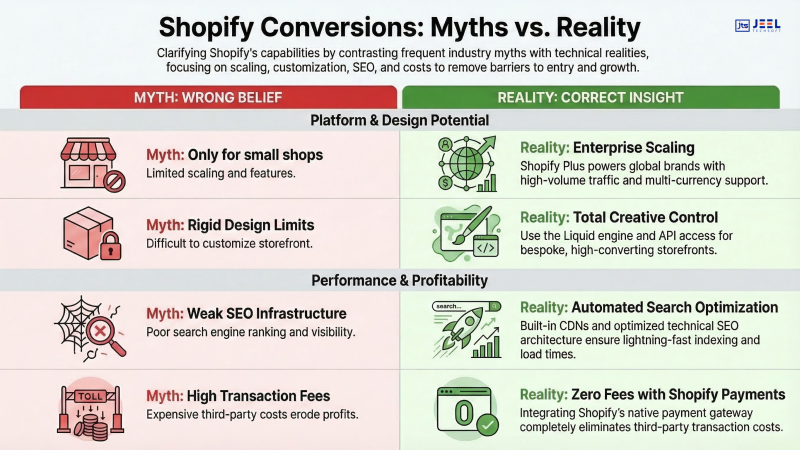
Popular Shopify beliefs that are wrong
There’s a pattern across struggling Shopify stores. It’s not a lack of effort; it’s misplaced effort. Founders and marketers often follow “best practices” that worked years ago but now actively harm performance.
Let’s break down the most common myths and why they’re quietly draining revenue.
Myth #1: More apps = more functionality = better store
Reality: More apps usually mean slower load times, script conflicts, and higher monthly costs.
Each installed app injects JavaScript, CSS, or API calls into your store. According to multiple ecommerce studies, even a 1-second delay in load time can reduce conversions by up to 7%. Stack 10–15 apps, and you’re creating friction at every interaction point.
Myth #2: Shopify handles performance automatically
Reality: Shopify provides a solid base, but performance optimization is still your responsibility.
Themes, third-party scripts, image sizes, and tracking codes all impact performance. Without proper ecommerce optimization services, stores often end up bloated despite being on a high-performance platform.
Myth #3: A “beautiful” design guarantees conversions
Reality: Visual appeal without usability kills trust.
Design isn’t just aesthetics; it’s clarity, speed, and decision-making flow. A visually stunning homepage that confuses users will underperform a simpler, structured layout that guides users to purchase.
Myth #4: All Shopify themes are optimized out of the box
Reality: Most themes require customization to match your business model.
Pre-built themes are designed for flexibility, not conversion efficiency. Without proper UI/UX design services, they often include unnecessary elements, oversized assets, and generic layouts that don’t align with user intent.
Myth #5: Conversion issues are always traffic problems
Reality: Most conversion issues are experienced problems.
If your store has traffic but low conversions, the issue is usually within the buying journey, not your marketing campaigns.
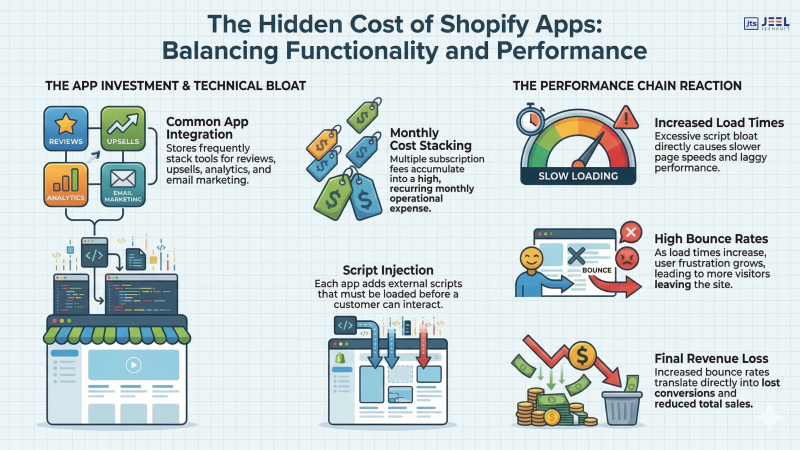
How apps quietly hurt performance and margins
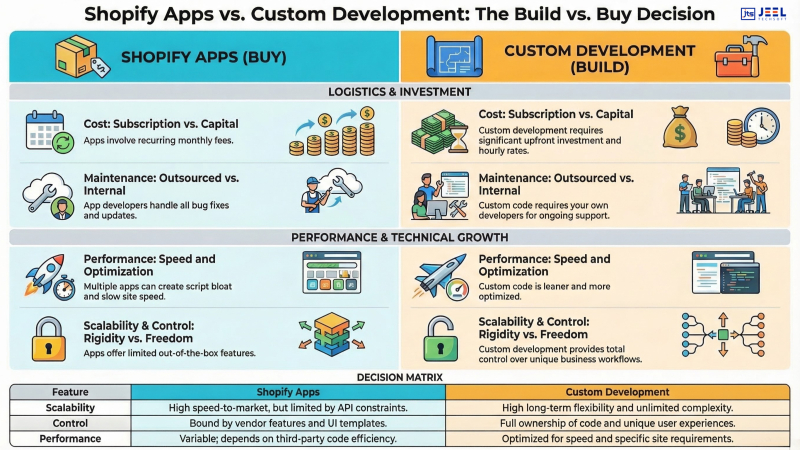
Apps are one of Shopify’s biggest strengths and one of its most misused features.
On paper, apps solve problems quickly. In reality, they often introduce hidden costs that compound over time.
1. Performance degradation
Each app adds:
- External scripts
- API requests
- Additional DOM elements
This leads to:
- Slower page load times
- Increased Time to Interactive (TTI)
- Higher bounce rates
For example, a store using 12 apps may load 2–3 seconds slower than a lean store. That difference alone can significantly impact conversions.
2. Compounding subscription costs
Most Shopify apps operate on a monthly pricing. Individually, they seem affordable. Combined, they can eat into margins.
Typical scenario:
- Upsell app: $29/month
- Review app: $19/month
- Email capture app: $25/month
- Analytics app: $49/month
Total: $120+ per month, and often overlapping functionality.
This is where strategic Shopify development services help consolidate features into custom-built solutions, reducing dependency on multiple apps.
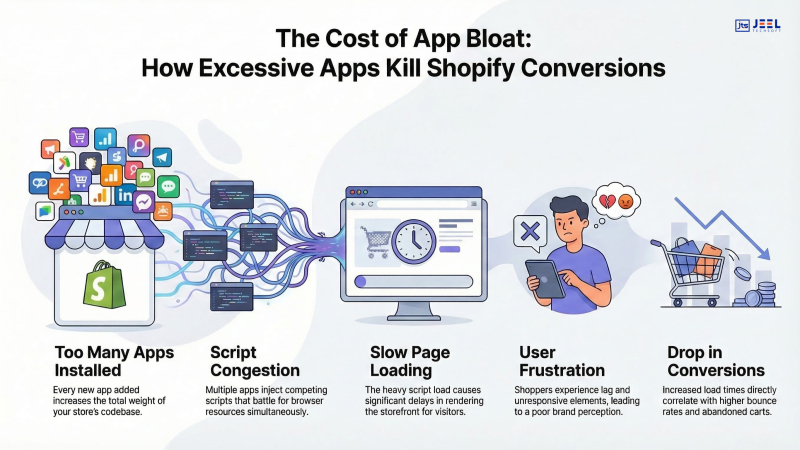
3. Script conflicts and instability
Apps are built by different developers. When combined:
- Scripts can conflict
- UI elements may break.
- The checkout experience can degrade
These issues are subtle but damaging, especially on mobile devices.
4. Poor scalability
As your store grows, app-heavy setups become harder to manage.
- More dependencies
- More failure points
- More maintenance overhead
A scalable approach focuses on core functionality built directly into your store rather than relying on layers of third-party tools.
5. Data fragmentation
Different apps store data in different systems. This leads to:
- Inconsistent reporting
- Poor decision-making
- Lack of centralized insights
Instead of clarity, you end up with scattered data and conflicting metrics.
External Insight: Studies on ecommerce performance consistently show that faster, leaner websites outperform feature-heavy stores in both conversions and retention. (Refer to leading ecommerce studies for deeper benchmarks.)
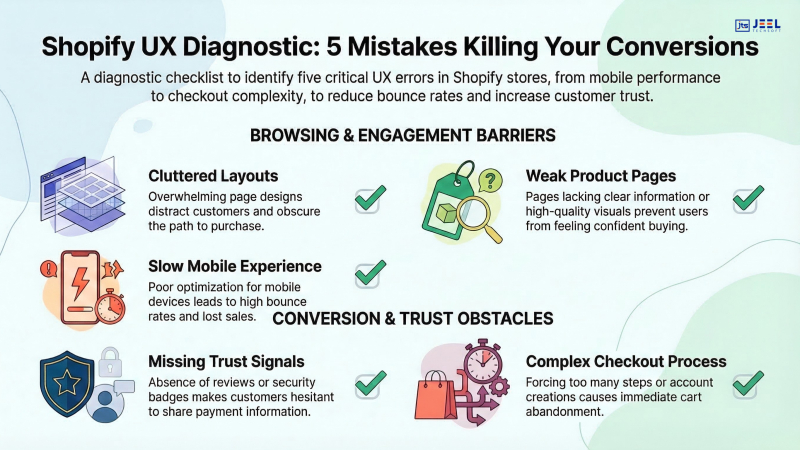
UX mistakes that reduce trust
Even with the right products and pricing, poor user experience can destroy conversions.
Trust is fragile in e-commerce. Small friction points add up quickly.
1. Cluttered layouts
Too many banners, popups, and sections overwhelm users.
Instead of guiding users, you create decision fatigue.
Fix: Prioritize clarity over quantity. Each page should have a single, clear objective.
2. Inconsistent design language
Different fonts, colors, and button styles create confusion.
Users subconsciously question the legitimacy of the store.
Fix: Maintain consistent branding across all pages. This is where professional UI/UX design services play a critical role.
3. Weak product pages
Common issues include:
- Poor product descriptions
- Lack of trust signals
- Missing FAQs
- Low-quality images
Your product page is your sales page. If it doesn’t answer objections, conversions drop.
4. Slow mobile experience
More than 60% of Shopify traffic is mobile. Yet many stores:
- Use heavy images
- Have unoptimized layouts
- Load unnecessary scripts
Fix: Design mobile-first, not desktop-first.
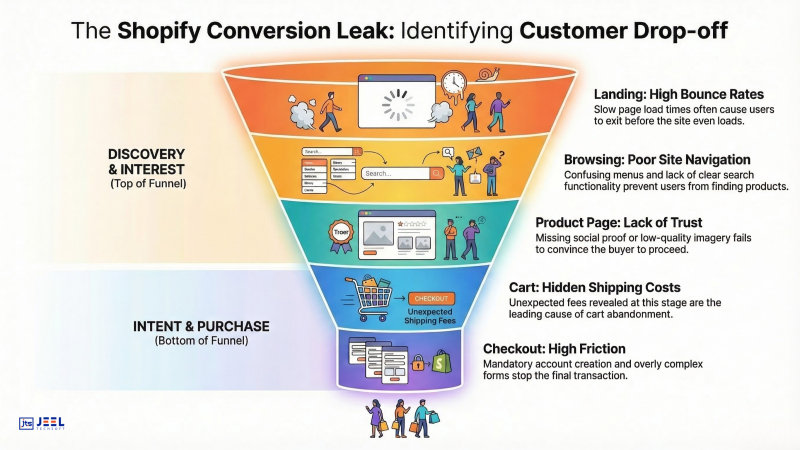
5. Checkout friction
Even small issues can cause drop-offs:
- Unexpected shipping costs
- Forced account creation
- Too many form fields
A smooth checkout experience is often the biggest conversion lever.
6. Lack of trust indicators
Missing elements like:
- Customer reviews
- Secure payment badges
- Clear return policies
These signals reduce hesitation and increase confidence.
Fixing the right problems first
One of the biggest mistakes in Shopify ecommerce development is solving the wrong problems.
Most store owners jump straight into:
- Redesigning the homepage
- Adding new apps
- Running more ads
But these actions rarely address the root cause.
Here’s how to approach it strategically:
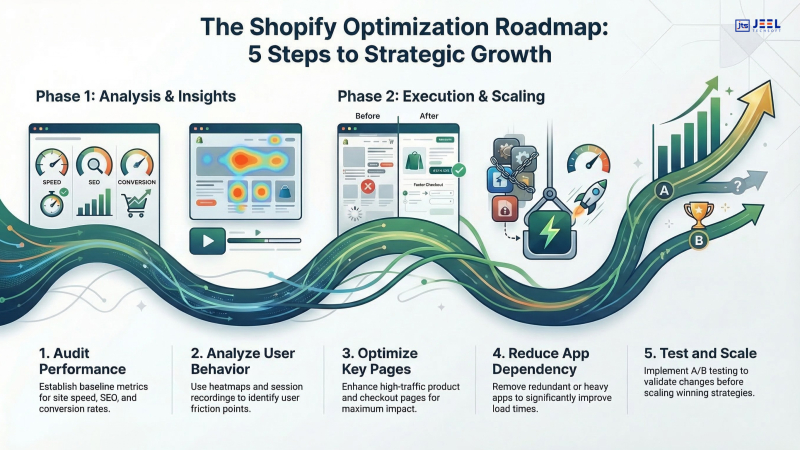
Step 1: Audit performance
Focus on:
- Page speed (Core Web Vitals)
- App load impact
- Script usage
Remove unnecessary apps and optimize assets before adding anything new.
Step 2: Analyze user behavior
Use tools like heatmaps and session recordings to understand:
- Where users drop off
- What they ignore
- What confuses them
This reveals real problems, not assumptions.
Step 3: Optimize high-impact pages
Prioritize:
- Product pages
- Collection pages
- Checkout flow
These pages directly influence revenue.
Step 4: Simplify your stack
Replace multiple apps with:
- Custom-coded features
- Native Shopify functionality
This reduces costs and improves performance.
Step 5: Align design with intent
Every element should support the buying journey:
- Clear CTAs
- Logical navigation
- Minimal distractions
This is where integrated e-commerce optimization services make a measurable difference.
Step 6: Test before scaling
Before investing in more traffic:
- Fix conversion bottlenecks
- Run A/B tests
- Validate improvements
Scaling a broken system only amplifies losses.
FAQs
Why do Shopify stores slow down?
- Shopify stores typically slow down due to excessive app usage, unoptimized images, heavy scripts, and poorly structured themes. Each added app increases load time and affects performance, especially on mobile devices.
How many apps are too many?
- There is no fixed number, but most high-performing stores operate with fewer than 6–8 essential apps. Beyond that, performance issues, script conflicts, and rising costs become common.
Do Shopify apps affect SEO and conversions?
- Yes. Slow-loading pages and script-heavy apps negatively impact both SEO rankings and conversion rates. Faster, streamlined stores tend to perform better in search results and user engagement.
What is the biggest mistake in Shopify development?
- The biggest mistake is focusing on adding features instead of improving user experience. Many stores invest in apps and design changes without addressing core issues like page speed, trust signals, and checkout friction.
Conclusion
Shopify itself isn’t the problem. The way most stores are built and managed is. Over-reliance on apps, neglecting UX fundamentals, and chasing the wrong fixes create hidden inefficiencies that quietly erode conversions and profitability.
When approached strategically, Shopify e-commerce development becomes a powerful growth engine, not a cost center. The difference lies in simplifying your stack, focusing on user experience, and solving problems that actually impact revenue.


