
If you want your store to grow beyond basic theme tweaks and apps, shopify api development becomes essential. APIs allow you to connect systems, automate operations, build headless storefronts, and design a scalable ecommerce architecture that supports real growth.
Whether you’re integrating ERP, building custom checkout logic, or expanding into omnichannel sales, APIs are no longer optional; they’re foundational.
Why APIs matter for ecommerce growth
Ecommerce growth is rarely limited by marketing alone. More often, it’s constrained by infrastructure.
As order volume increases, product catalogs expand, and customer journeys become more complex, a basic setup struggles to keep up. Manual processes creep in. Data silos appear. Performance drops. That’s where shopify api development shifts from “nice to have” to mission-critical.
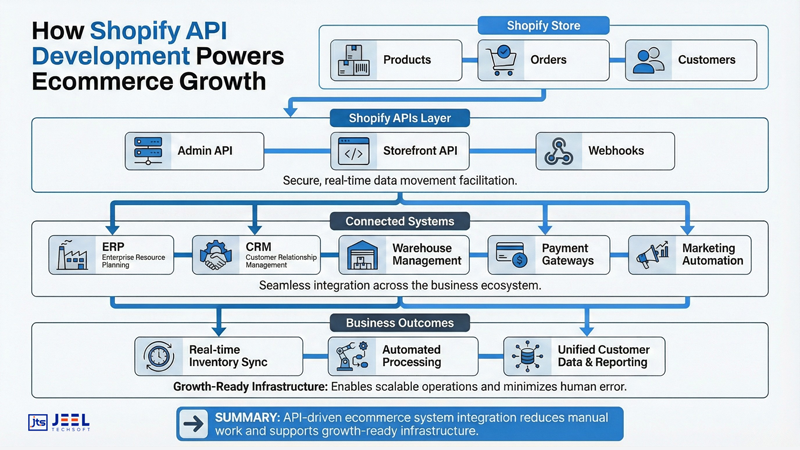
APIs (Application Programming Interfaces) allow Shopify to communicate with external systems CRMs, ERPs, PIMs, inventory systems, logistics tools, analytics platforms, and custom applications. Instead of forcing teams to operate across disconnected dashboards, APIs create real-time data flow.
Here’s what that means in practice:
- Inventory updates sync automatically across warehouses.
- Orders push instantly to fulfillment systems.
- Customer data flows into marketing automation platforms.
- Custom business logic runs without breaking the theme’s performance.
In a study by MuleSoft, organizations using API-led connectivity reported 47% faster project delivery and significant cost savings due to reusable integrations. For ecommerce, that translates into faster expansion and fewer operational bottlenecks.
Without an API strategy, growth becomes chaotic. With API architecture, growth becomes controlled.
Common Shopify API use cases
Most merchants start with apps. That works early on. But serious ecommerce brands eventually outgrow one-size-fits-all tools.
Here are the most common use cases where shopify api development delivers measurable impact.
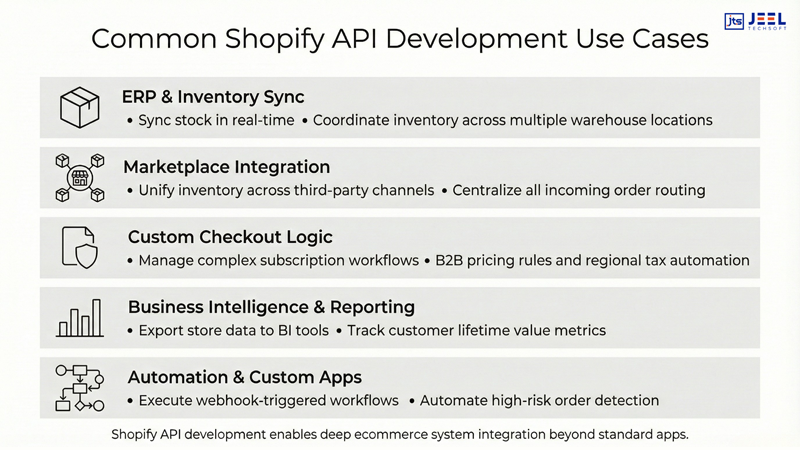
1. ERP and Inventory Synchronization
As brands scale, spreadsheets become dangerous. API-driven ecommerce system integration allows:
- Real-time stock synchronization
- Multi-location warehouse management
- Automated purchase order creation
- Accurate cost-of-goods tracking
Instead of manual imports, the Shopify Admin API connects directly to ERP systems like NetSuite, SAP, or Microsoft Dynamics.
2. Custom Checkout Logic
High-growth brands often need:
- Subscription models
- B2B pricing tiers
- Country-specific tax rules
- Dynamic discount engines
Using Shopify APIs and webhooks, developers can extend functionality beyond standard checkout flows while maintaining performance and compliance.
3. Marketplace & Omnichannel Integration
Selling across Amazon, Walmart, POS, and social platforms requires centralized control. APIs allow:
- Unified inventory management
- Centralized order routing
- Automated reconciliation
Without API integration, overselling and data inconsistency become common problems.
4. Advanced Reporting & BI
Shopify’s native analytics are helpful, but enterprise-level decision-making requires more.
With API-based extraction:
- Sales data feeds into BI dashboards
- Customer lifetime value is calculated externally
- Marketing attribution models improve accuracy
This builds a data-driven culture instead of guess-based growth.
5. Custom Apps & Automation
Sometimes, you simply need functionality no app provides.
Custom apps built on Shopify APIs can:
- Automate refunds based on logic
- Flag high-risk orders
- Trigger internal workflows
- Create custom dashboards
This is where structured API development services create long-term leverage.
Headless and integration scenarios
Shopify is powerful as a hosted platform. But brands seeking design freedom, performance optimization, or omnichannel flexibility often move toward headless architecture.
What is headless commerce in Shopify?
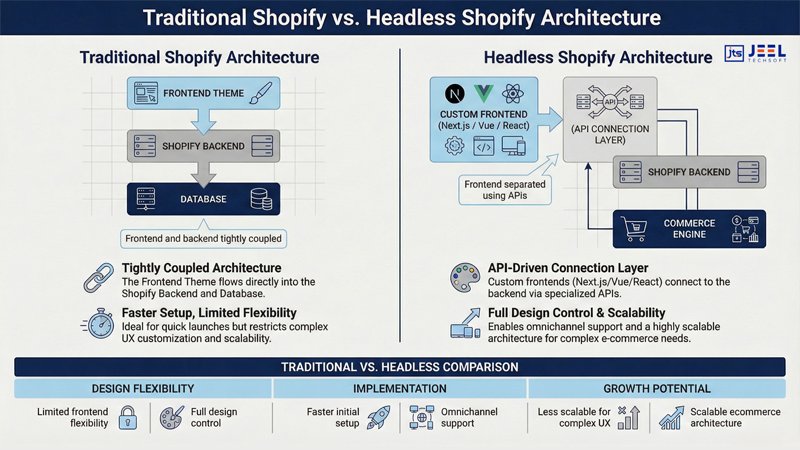
In a traditional Shopify store, the frontend (theme) and backend are tightly connected.
In headless Shopify:
- The backend remains Shopify (products, orders, customers).
- The frontend is built separately using frameworks like Next.js, Vue, or React.
- APIs connect both layers.
This enables complete control over UX while retaining Shopify’s commerce engine.
When does headless make sense?
Headless becomes valuable when:
- Page speed optimization is a priority.
- You need a mobile app sharing the same backend.
- You want progressive web app (PWA) performance.
- Complex content layers are required.
This architecture supports a scalable ecommerce architecture, especially for high-traffic brands.
Example scenario
Imagine a brand expanding globally with localized content, region-based pricing, and multilingual experiences.
With traditional theming, complexity increases rapidly.
With headless + APIs:
- Frontend queries product data dynamically.
- Localization logic runs separately.
- Performance remains optimized.
Headless is not about trends; it’s about flexibility at scale.
Implementation steps, auth rate limits and monitoring
Technical details don’t have to be intimidating. Let’s simplify the core implementation components.
1. Authentication
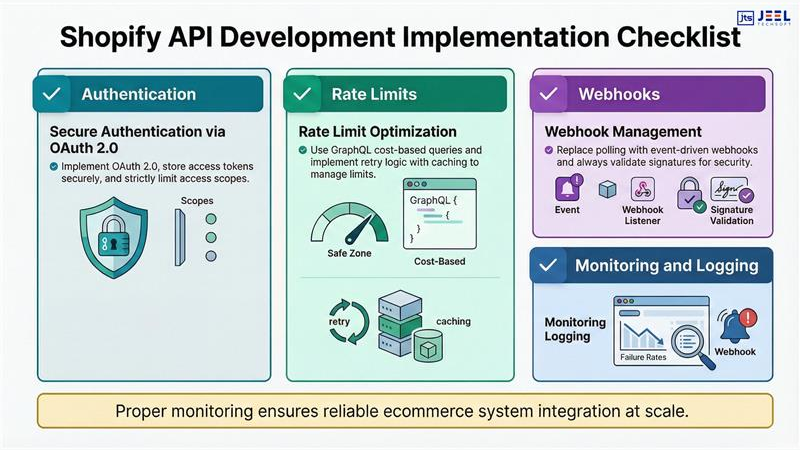
Shopify APIs use OAuth 2.0 for secure access.
Key steps:
- Register a custom or public app.
- Request necessary scopes (read_products, write_orders, etc.).
- Store access tokens securely.
- Never expose tokens client-side.
Security errors often arise from poor token handling. Keep authentication server-side whenever possible.
2. Rate Limits
Shopify enforces API rate limits to protect platform stability.
REST Admin API:
- Uses a leaky bucket algorithm.
- 40 requests per app per store per second (varies by plan).
GraphQL API:
- Uses cost-based limits instead of request counts.
How to avoid rate limit issues:
- Batch requests when possible.
- Use GraphQL instead of REST for efficiency.
- Implement retry logic with exponential backoff.
- Cache frequently requested data.
Ignoring rate limits leads to failed syncs and delayed updates, two things that hurt customer experience quickly.
3. Webhooks
Polling APIs repeatedly is inefficient.
Webhooks solve this by pushing real-time events when something happens:
- Order created
- Product updated
- Customer deleted
This reduces unnecessary API calls and improves performance.
4. Monitoring & Logging
API integration without monitoring is risky.
Best practices:
- Log every API request and response.
- Track failure rates.
- Set alerts for error spikes.
- Monitor webhook delivery status.
Observability ensures integrations don’t silently fail during peak sales periods.
5. Testing & Staging
Before deployment:
- Use development stores.
- Simulate edge cases (high volume, failed payments).
- Test rollback scenarios.
Growth often fails not due to ambition, but due to untested integrations.


