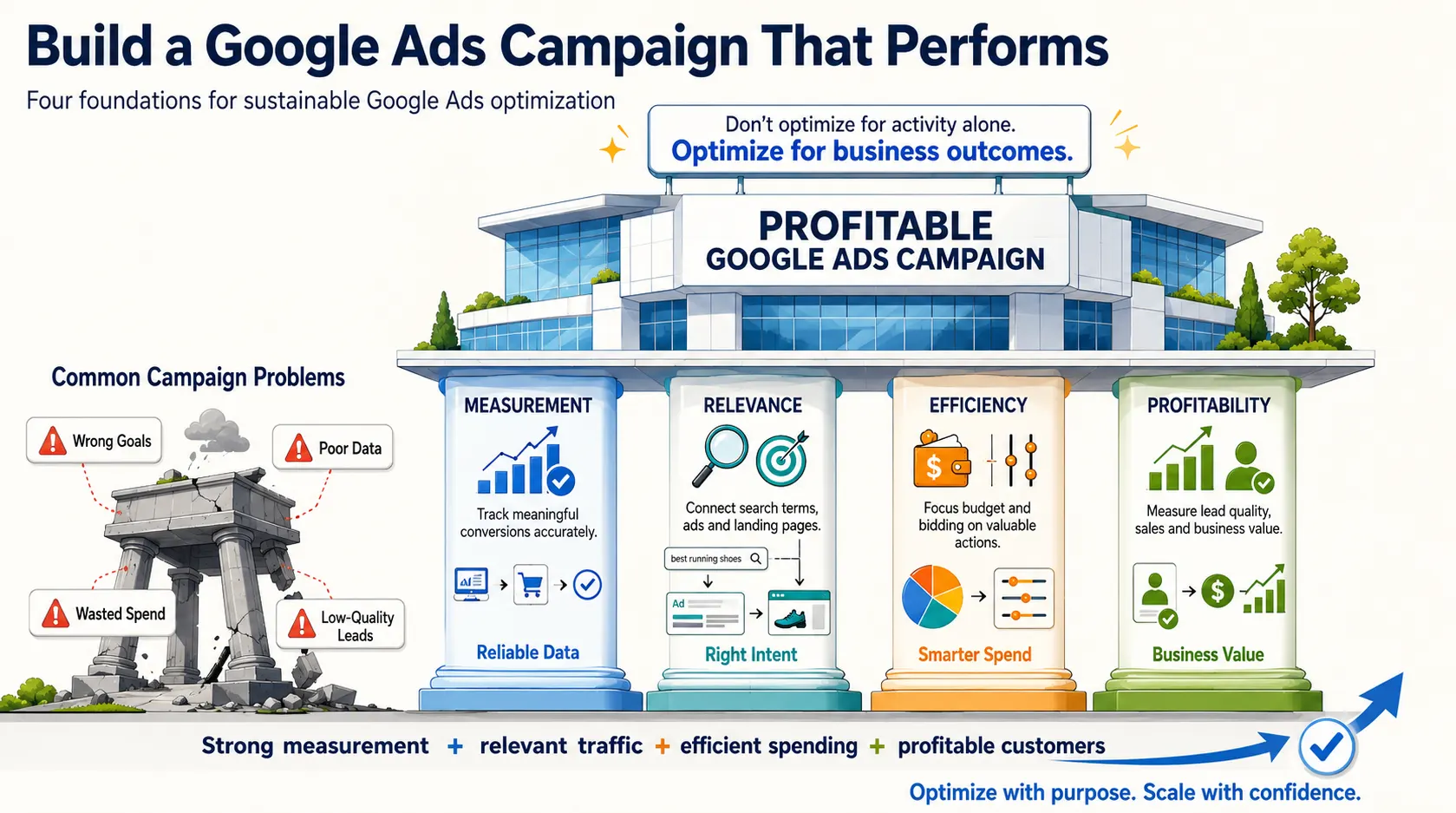
Google Ads can generate plenty of clicks and even show a healthy number of reported conversions, yet still fail to deliver profitable customers.
The problem is often hidden behind surface-level metrics that make a campaign appear successful. Poor conversion tracking, irrelevant search terms, weak targeting, incorrect bidding strategies, and low-quality landing pages can quietly consume your advertising budget without producing meaningful business results.
These issues can be difficult to identify unless you regularly analyze campaign performance beyond clicks and impressions.
Understanding the most common Google Ads mistakes is essential for reducing wasted ad spend and improving overall campaign performance.
By reviewing conversion data, search terms, keyword targeting, audience performance, ad relevance, and landing page quality, businesses can identify where their budget is being wasted.
This guide covers the key Google Ads mistakes to avoid and provides practical strategies to help you optimize campaigns, attract more qualified prospects, and achieve stronger commercial results.
How to Tell Whether Your Google Ads Budget Is Being Wasted
Look beyond clicks and platform conversions. Warning signs include irrelevant search terms, rising spend without qualified leads, a mismatch between Google Ads and CRM data, strong click-through rates with weak landing-page results, and cheap leads that rarely close.
Compare ad data with call records, sales, revenue, and gross margin to separate business value from activity.
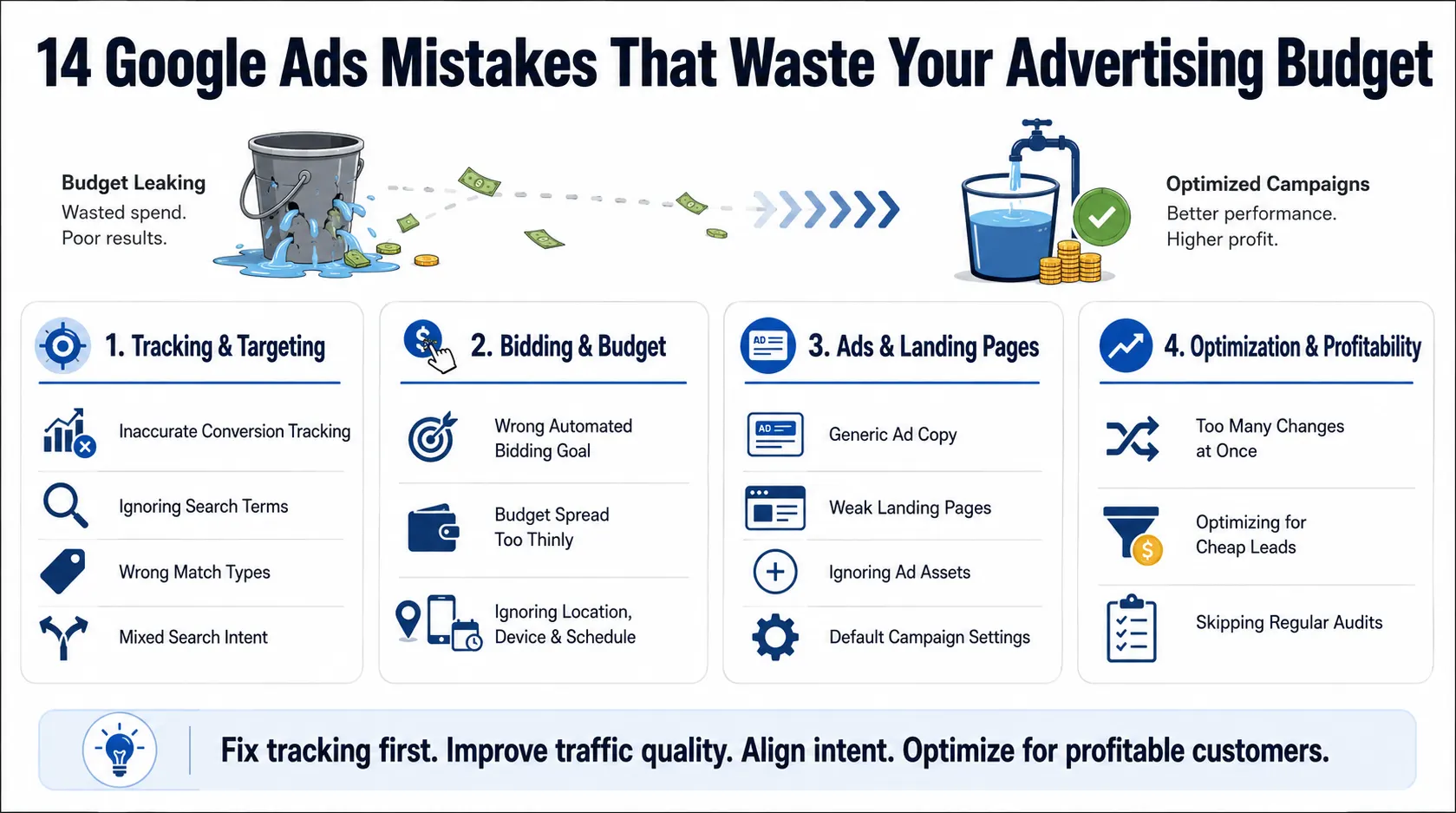
Mistake 1: Running Campaigns Without Accurate Conversion Tracking
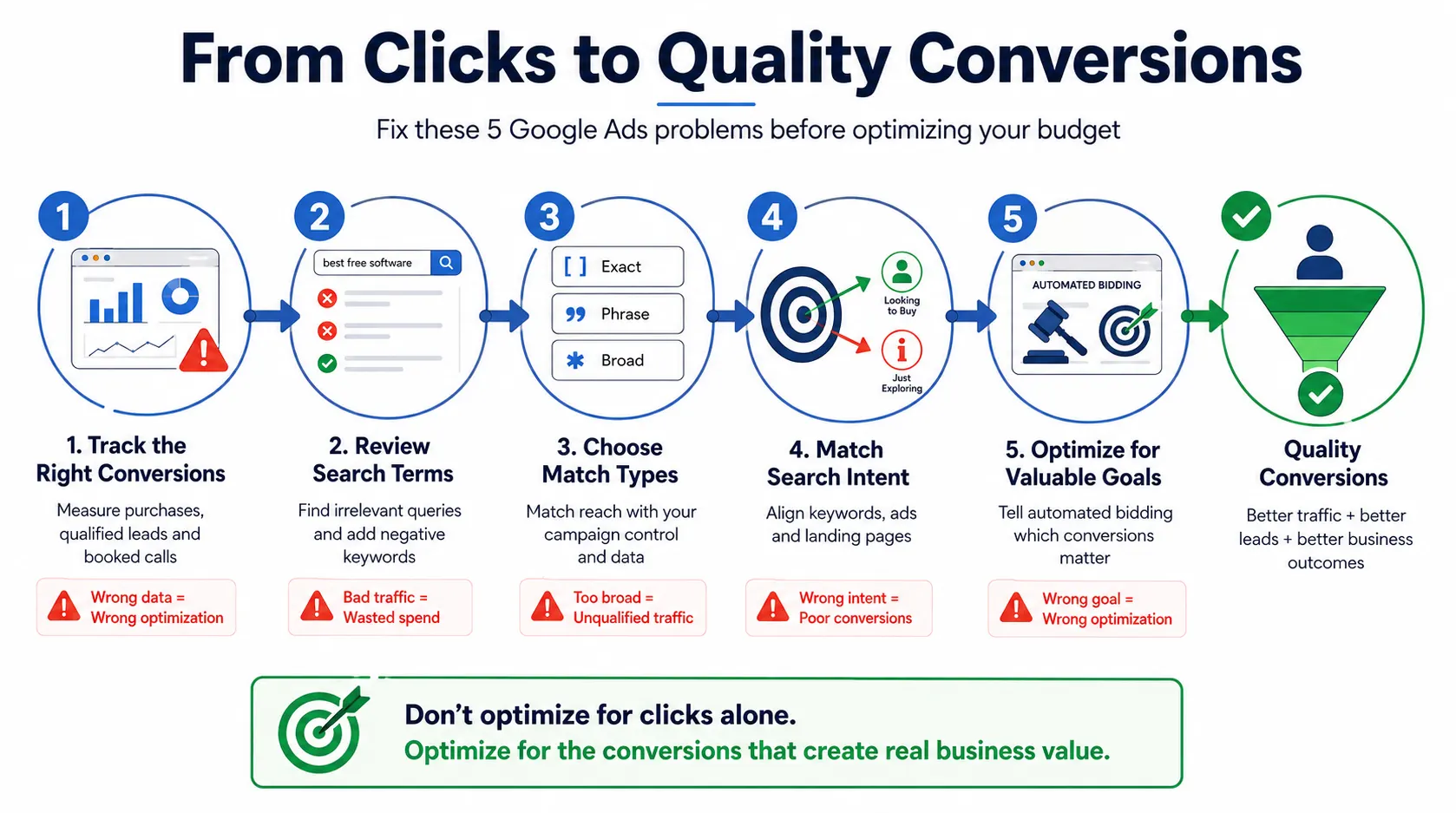
Conversion tracking should measure meaningful actions such as purchases, booked calls, and qualified forms. Primary actions guide bidding; secondary actions are observation-only. Treating page views or low-intent clicks as primary conversions can direct bidding toward the wrong outcome.
How to Audit Google Ads Conversion Tracking
Test every action, confirm it fires once, verify its value, remove duplicates, and compare reported leads with CRM records. For lead generation, import qualified or closed outcomes whenever possible.
Mistake 2: Targeting Keywords Without Reviewing Search Terms
Keywords describe what you want to target; search terms show what people actually typed. The report may reveal spend on jobs, free resources, research queries, or unrelated services. Google recommends excluding irrelevant terms with negative keywords.
Build and Maintain a Negative Keyword Strategy
Maintain shared and campaign-level negative lists. Review search terms weekly, judging them by relevance, volume, conversion cycle, and lead quality—not one failed click.
Mistake 3: Using the Wrong Keyword Match Types
Exact, phrase, and broad match provide progressively wider reach, although all can include close variants.
Broad match becomes risky when tracking is weak, negatives are neglected, or campaigns mix different intents. Introduce it selectively and monitor the quality of enquiries rather than relying solely on the number of conversions.
Mistake 4: Combining Different Search Intents in One Campaign or Ad Group
“Payroll software guide” and “book payroll software demo” represent different stages in the buying process. Combining them forces one ad and landing page to answer two different needs.
Create Tightly Aligned Keyword, Ad, and Landing Page Groups
Group keywords by service, intent, location, and buying stage. Each group should use relevant ad language and a matching landing page. Google also recommends separating keyword themes that cannot be addressed effectively by the same ad.
Mistake 5: Letting Automated Bidding Optimize Toward the Wrong Goal
Automated bidding follows the conversion goals and values supplied to it.
If newsletter sign-ups, button clicks, and qualified opportunities are treated equally, the campaign may pursue the easiest action. Use primary goals and values that reflect genuine commercial progress.
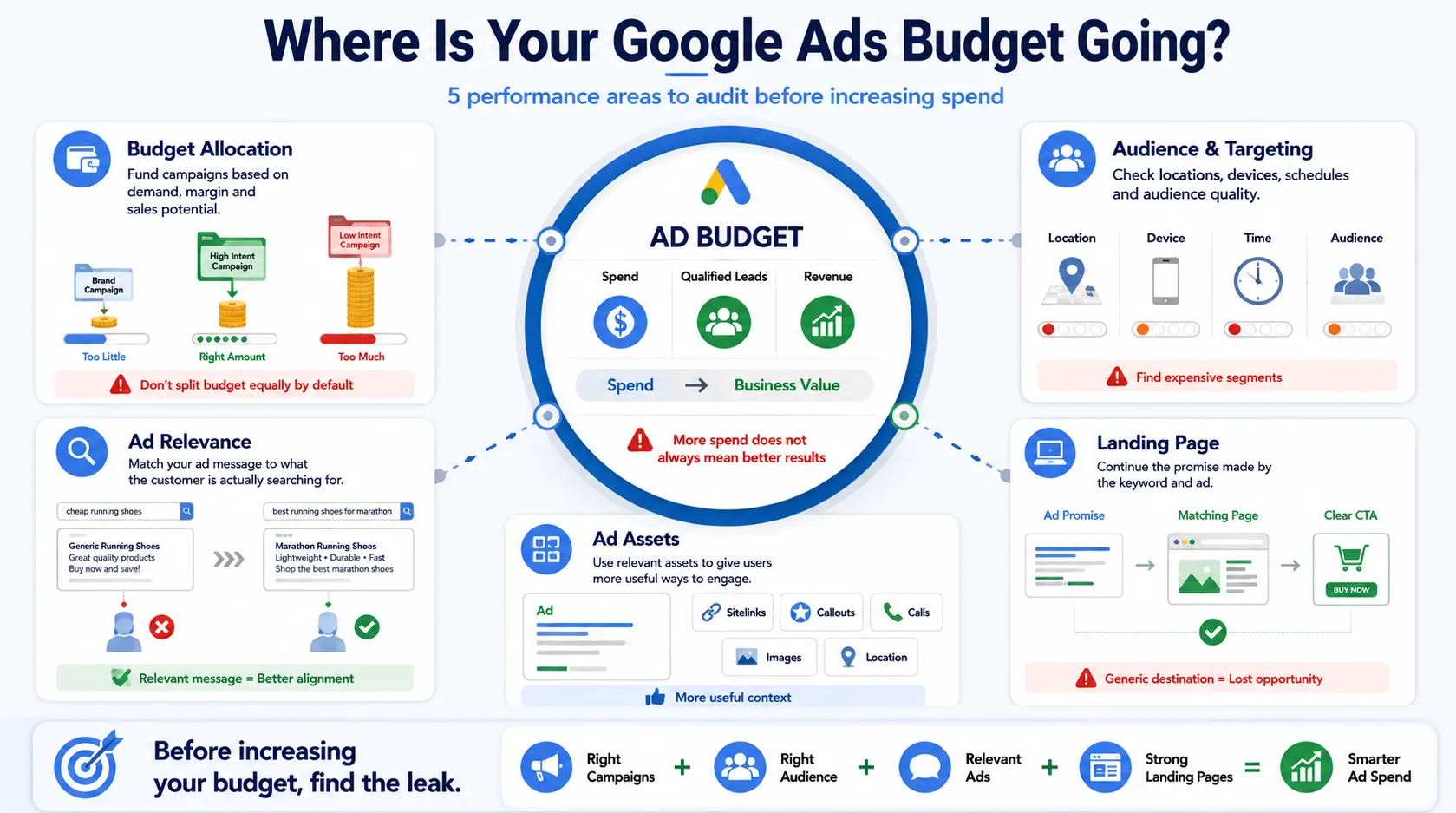
Mistake 6: Spreading the Budget too Thinly Across Campaigns
Too many underfunded campaigns fragment data. Small budgets may not generate enough activity to evaluate keywords, ads, or bidding confidently.
How to Allocate Google Ads Budget More Effectively
Prioritize campaigns by margin, demand, conversion readiness, and sales capacity. Fund proven services first and review qualified cost per acquisition, conversion value, and lost impression share before reallocating spend.
Do not divide the budget equally simply because every service has its own campaign.
Mistake 7: Ignoring Location, Device, Schedule, and Audience Performance
Account averages can hide expensive segments. Mobile forms may underperform, calls may waste spend after business hours, and certain regions may produce leads but no sales.
Review user locations, devices, hours, and audience performance. Google notes that location targeting uses multiple signals and is not perfectly precise, so check reports rather than relying on assumptions.
Mistake 8: Using Generic Ads That Do Not Match Search Intent
“Quality Service at Great Prices” does not explain relevance, value, or the next step. It could describe almost any company.
Google Ads Optimization Tips for Stronger Ad Copy
Include the product or service, a genuine differentiator, a useful qualifier, and a clear action. Responsive search ads allow multiple headlines and descriptions to be tested in different combinations.
Test benefits, objections, proof, and intent rather than repeating one claim with slightly different wording.
Mistake 9: Sending Paid Traffic to Weak or Irrelevant Landing Pages
Sending every visitor to the homepage creates unnecessary work. The destination should continue the promise made in the keyword and ad.
Google includes landing-page relevance and usefulness in its landing-page experience diagnostics.
What a Conversion-Focused Landing Page Should Include
Use a clear headline, relevant benefits, proof, a visible CTA, qualification details, and a short form. Remove distracting navigation where appropriate.
See the related conversion rate optimization guide for deeper landing-page improvements.
Mistake 10: Ignoring Ad Assets and Supporting Campaign Information
Sitelinks, callouts, calls, prices, images, and location information add context and create more routes to conversion. Google recommends using assets relevant to the business goal.
Review approval status, scheduling, destination links, relevance, and performance. Replace generic sitelinks with pages that answer specific customer needs.
Mistake 11: Leaving Default Campaign Settings Unchecked
Default settings suit broad use cases, not every business. Before launch, review networks, locations, location options, languages, conversion goals, bidding, schedules, brand settings, and auto-applied recommendations.
One unchecked setting can expand reach beyond the intended audience and quietly consume the budget.
Mistake 12: Making Too Many Campaign Changes at Once
Changing bids, ads, keywords, budgets, goals, and landing pages together makes it impossible to identify what helped. Automated bidding may also need time to recalibrate after significant changes.
Use a change log and test one variable at a time. Google Ads experiments can compare controlled changes, while overlapping tests may reduce the reliability of results.
Mistake 13: Optimizing for Cheap Leads Instead of Profitable Customers
A low-cost lead has little value when it never qualifies or closes. This is one of the most damaging Google Ads campaign mistakes because platform reports may show success while the sales team receives poor enquiries.
Track lead-to-opportunity rate, close rate, average order value, margin, repeat revenue, and cancellations. This shifts Google Ads campaign optimization from producing form submissions to acquiring profitable customers.
Mistake 14: Failing to Run Regular Google Ads Optimization Audits
Campaigns drift as search behaviour, pricing, competition, and priorities change. Regular reviews prevent persistent Google Ads budget mistakes.
Weekly Google Ads Optimization Tasks
Check spend pacing, tracking alerts, search terms, ad disapprovals, budget limits, cost changes, and lead quality. Add justified negative keywords and investigate unusual performance changes.
Monthly Google Ads Optimization Tasks
Compare campaign, keyword, location, device, schedule, audience, ad, and landing-page performance. Reallocate budget using qualified cost per acquisition or conversion value, refresh weak ads, and reconcile conversions with CRM data.
Quarterly Strategic Review
Reassess account structure, bidding, conversion values, customer economics, seasonality, landing-page coverage, and competitor positioning. Decide what to scale, rebuild, pause, or test.
A Practical Framework for Fixing Google Ads Campaign Mistakes
Fix problems in this order:
- Measurement: Confirm that meaningful conversions are tracked accurately.
- Traffic quality: Remove irrelevant searches and tighten targeting.
- Intent alignment: Connect keywords, ads, and landing pages.
- Budget and bidding: Fund priorities and optimize toward valuable actions.
- Profitability: Compare platform results with CRM and revenue data.
- Testing: Make controlled changes and evaluate the results.
Evaluate each material change against qualified conversions or revenue. Businesses offering account support can link this section to their Google Ads management services.